




 Australia








Wanted Win Login
Getting into your account takes two things: the email you registered with and your password. This page covers the Wanted Win login from every angle, starting with what to have ready before you tap Log In. We then show how to sign in through the web app on your phone, how to reset a forgotten password and how to clear the errors players run into most often. The last part explains what waits for you once you are in, from your AUD balance to an active bonus.

Wanted Win Login: What to Have Ready

A smooth Wanted Win login depends on details you set during registration, so it helps to know which ones matter.
Your email address. This is your username. You entered it when you created the account, and we sent a confirmation link to it. Until that link is clicked, the account is not fully active, so check your inbox if you have just signed up.
Your password. Chosen by you at registration. Passwords are case-sensitive, so "Spin2026" and "spin2026" count as two different entries.
One account per person. Our rules allow a single account for each player. If you think you may have registered twice, do not create a third profile; ask support to look into it instead.
A fixed email. The address on your account cannot be swapped for another one later. Keep access to that mailbox, because password resets and offers are sent there.
You do not need documents to sign in. Identity checks come up only when you ask for your first withdrawal: a photo ID plus a paper that confirms your address.
With the email and password at hand, the process itself is short:
- Open the site and tap Log In in the top corner.
- Type your email address.
- Type your password, using the eye icon if you want to see what you entered.
- Confirm, and the lobby loads with your balance at the top.
On a wide screen the Log In button sits in the header, to the right of our logo, next to the gold Sign Up button. On a phone the header shrinks, but both buttons stay in the same corner, so the route is identical whichever device you hold.

Signing In From the Home-Screen Web App
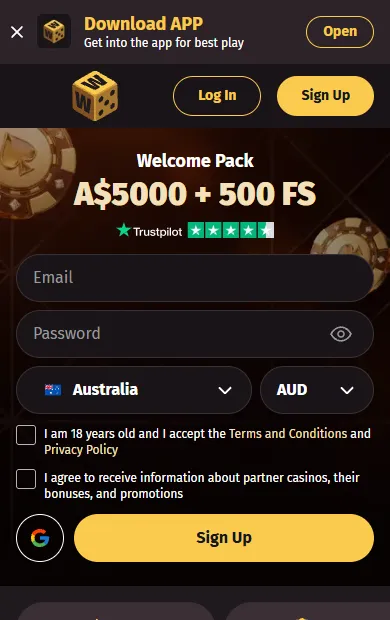
We do not publish a native app in the App Store or Google Play. Our casino runs in the mobile browser instead, and you can turn it into a web app that sits on your screen next to everything else. For many players this is the easiest Wanted Win casino login Australia has to offer: one tap on the icon, then your email and password.
To set up the icon on an iPhone or iPad:
- Open the site in Safari.
- Tap the Share button.
- Choose Add to Home Screen and confirm.
On an Android device:
- Open the site in Chrome or another browser.
- Open the browser menu (three dots).
- Choose Add to Home screen or Install.
The web app shows the same lobby, cashier and promotions as the full site on a computer. Your account is the same on every device, so a balance topped up on your laptop is waiting on your phone, and a bonus started on the phone can be finished on the desktop.
If the icon ever stops opening the right page, delete it and add it again from the browser. Nothing in your account changes when you do this.
New to the site and holding only a phone? Registration works there too. Enter an email, a password, your country and AUD as the currency, tick the boxes for 18+ and the terms, then confirm the address through the link we send. After that, the same details open your account on any screen.

Resetting a Forgotten Password
Forgetting a password is the most common reason a sign-in fails, and the fix takes a couple of minutes:
- Tap Log In, then Forgot Password under the form.
- Enter the email address on your account.
- Open the message we send and click the reset link inside it.
- Choose a new password and confirm it.
- Return to the site and complete your Wanted Win casino login with the new details.
A few tips make this go smoothly. Use the same browser on the same device for the whole reset, so the link opens where you started. If the message has not arrived within a few minutes, look in the spam or promotions folder and check that you typed the address exactly as it was at registration. Request a new link rather than reusing an old one.
When you choose the new password, pick something you have not used on other sites. A longer phrase is easier to remember and harder to guess than a short word with a number on the end.

Login Errors and How to Clear Them
Most problems at the Wanted Win login screen have a simple cause. Use this table to match what you see with what to do:
| What happens | Likely cause | What to do |
|---|---|---|
| "Wrong email or password" | typo, Caps Lock, or a different email | retype slowly, check Caps Lock, try the reset link |
| Account not active | email not confirmed after registration | click the link in our confirmation message |
| Reset message missing | spam folder or typo in the address | check spam, then request the link again |
| Page will not load | old browser data | refresh, clear the cache or try another browser |
| Access closed | cooling-off or self-exclusion period in place | wait until the period you chose ends |
The last line deserves a word. If you set a cooling-off period, from one day up to six months, or a self-exclusion of six to twelve months, the account stays closed until the chosen date passes. We cannot open it early, because the tool exists to protect you.
If none of the fixes works, contact our support team. Live chat runs 24/7 and email is also available. Tell the agent which email you registered with and what message you see, and never share your password with anyone, including us.

What You See After Signing In
The lobby opens once the Wanted Win casino login is complete, and your account bar shows the balance in Australian dollars. From there you can reach every part of the site.
- Cashier. Make a deposit, and tick the box for bonuses if you want the welcome match on it. Withdrawals are made here as well; most are processed within 1 to 72 hours, while bank transfers take 3 to 5 days.
- Bonuses. An active bonus is listed in your account. Each one lasts 14 days, so check the timer before you start a long session.
- Verification. Upload your ID and proof of address before your first withdrawal to avoid waiting later.
- Limits. Set deposit, loss and bet limits in your profile, or schedule a break.
- Promotions. Weekly offers and codes are listed in the promotions tab.
- Loyalty. Real-money play earns points that lift you through ten levels, and VIP members are given a personal manager who answers their questions directly.
Signing out on a shared computer is a good habit. Tap your profile and choose the exit option, especially if other people use the same browser.
Sign-In Questions
Can I use the same account on my phone and my computer?
Yes. One account works on every device, through the browser or the home-screen web app, with the same balance and bonuses.
How many accounts can I open?
One. Our rules allow a single account per person, so use your existing email and password rather than registering again.
I made a typo in my email at registration. What now?
The email on an account cannot be changed by the player. Contact support on live chat, and an agent will explain the next steps.
Do I need documents to sign in?
No. You can sign in, deposit and play without them. We ask for a photo ID and proof of address only before your first withdrawal.
Will my bonus still be there after I sign out?
Yes. A bonus stays on your account for 14 days whether you are signed in or not, so you can continue the next time.
Who can help if the Wanted Win login still fails?
Our support team, on live chat 24/7 or by email. Agents help players across the country, so the Wanted Win casino login Australia players use is never more than a message away from a fix.
18+ · New players: up to A$5,000 + 500 free spins on the first five deposits.
Sign Up